
.
blog.icewolf.ch
Let's talk about it - (2962 Blog Articles)
  • About me
  • Impressum
  • Speaker

Silent Install of Remote Server Administration Tools (RSAT)

Andres Bohren
2011-07-30

Hallo zusammen

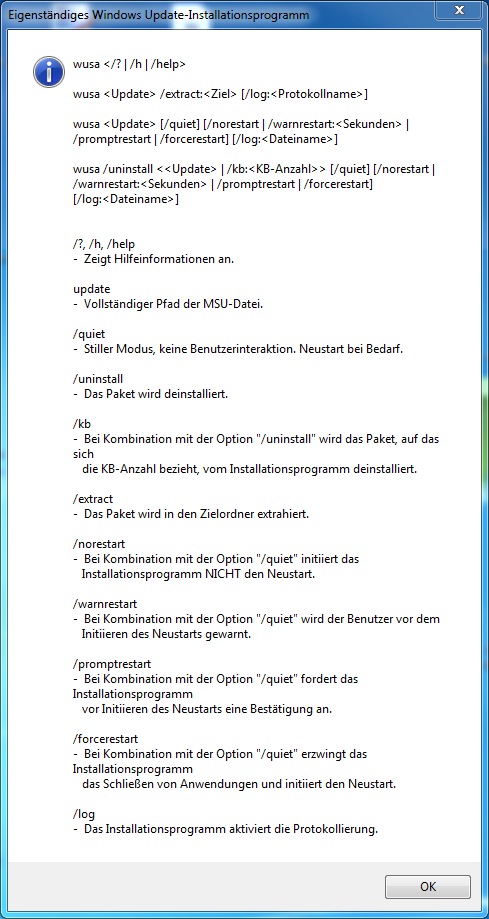
In diesem Artikel zeige ich euch wie die RSAT silent installiert werden können
RSAT Vista http://www.microsoft.com/download/en/details.aspx?displaylang=en&id=21090
RSAT Win7 SP1 http://www.microsoft.com/download/en/details.aspx?id=7887

wusa.exe C:\Install\Windows6.1-KB958830-x64-RefreshPkg.msu /quiet

Grüsse
Andres Bohren

  • Windows
About Andres Bohren
Andres works as a Senior Microsoft Cloud Engineer/Architect for midsize to large Enterprises at isolutions in Switzerland. He has a special focus on M365 including Identity, Messaging, Communication, Security and PowerShell but also some Azure Technologies. He is Co-Organisator of the Microsoft 365 Community Schweiz Meetup group, Co-Organizator of Swiss PowerShell User Group and was Speaker at several other Meetups or Conferences. He likes good Food, his Bike and nice Dive spots all over the World.
« Previous

Exchange 2010 Update Rollup4 re-released

Next »

Exchange Mailbox forwarding (deliverAndRedirect)

Recent Posts

  • Azure Automation Account Runtime Environment 7.6 with AZ PowerShell
  • Microsoft AI has released the MAI Models
  • Azure Storage Explorer 1.43.0
  • Entra Verified ID Upgrade signing key to become FIPS compliant
  • New Work hours and location breaks Set-MailboxCalendarConfiguration
  • Azure PowerShell Module AZ 15.5.0 released
  • Entra Connect Sync 2.6.3 released
  • PowerShell Module Microsoft.Online.SharePoint.PowerShell 16.0.27111.12000 released
  • Azure Storage Explorer 1.42.0
  • MicrosoftTeams PowerShell Module 7.7.0 released

Tags

AI AZURE Citrix COPILOT DEVELOPMENT Dotnet Enterprise Vault ENTRA Entra ID EXCHANGE FOUNDRY Fun HARDWARE INTUNE Linux LOOP MICROSOFT365 MICROSOFTTEAMS MS GRAPH NETWORK OFFICE PLACES POWERSHELL SECURITY SHAREPOINT SQL SYSTEM MANAGEMENT UM/MOBILE VIRTUALISATION WEB WINDOWS

Clustermaps

Buy me a coffee

About me | Impressum | Speaker
© 2026 Andres Bohren. Generated with Hugo and Mainroad theme.