
Exchange Admin Audit Log in Exchange Online

Hi All,
I’ve had a customer, where we migrated the Mailboxes to Exchange Online.
After that the customer discovered he had a Script running Monthly in Exchange OnPrem that run the Exchange Admin Audit Log and exported the XML File. That was then processed by another Script to extract when FullAccess and SendAs Permissions where assigned by Administrators.
In this Article i’ve show you how that might have be done in Exchange OnPrem and provide a Solution how this can be archieved in Exchange Online with Purview Audit Log and Azure Automation.
Exchange OnPrem
Administrator Audit Logging in Exchange Server records configuration changes made by administrators, enabling organizations to track who changed what, when it was changed, and support auditing, compliance, and troubleshooting requirements
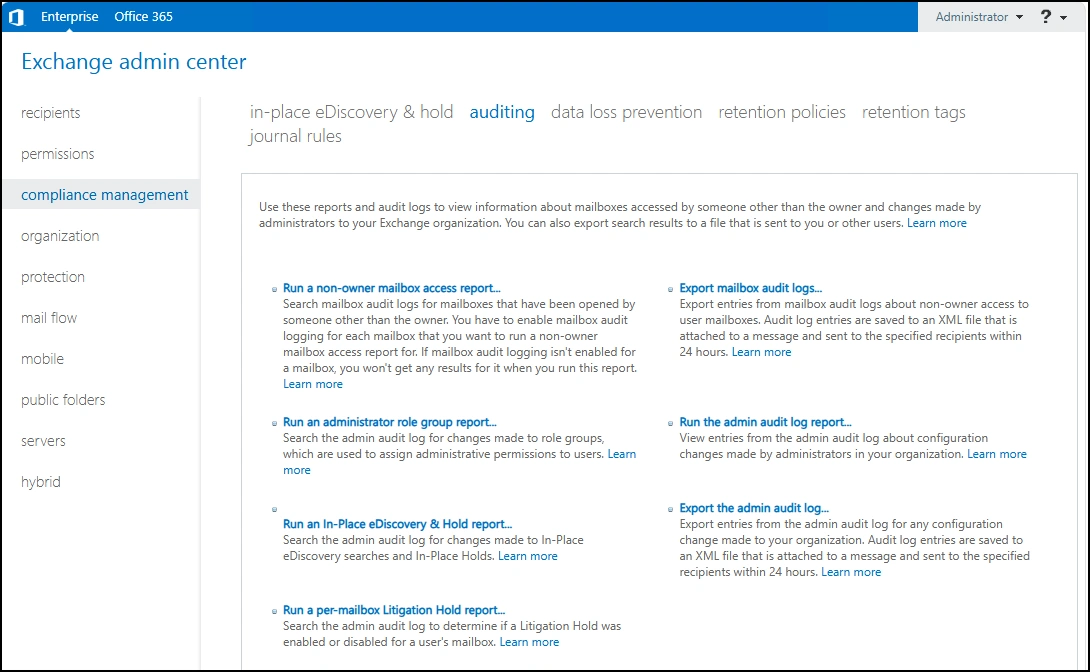
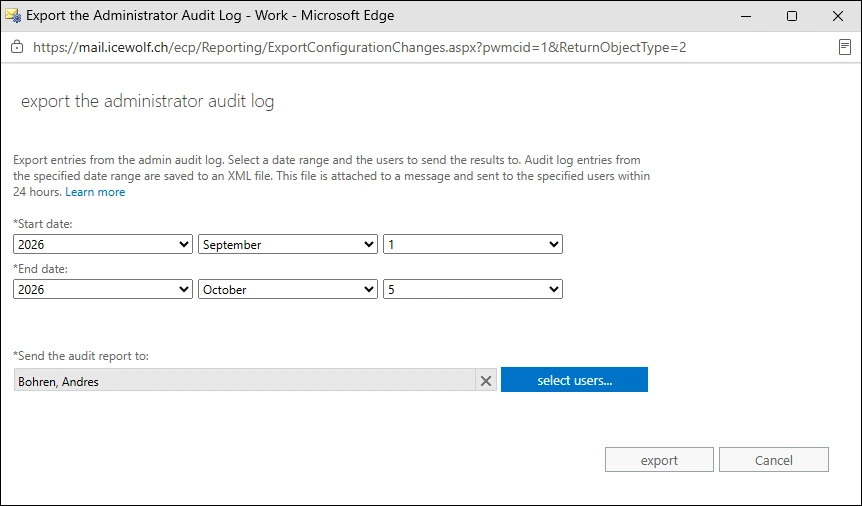
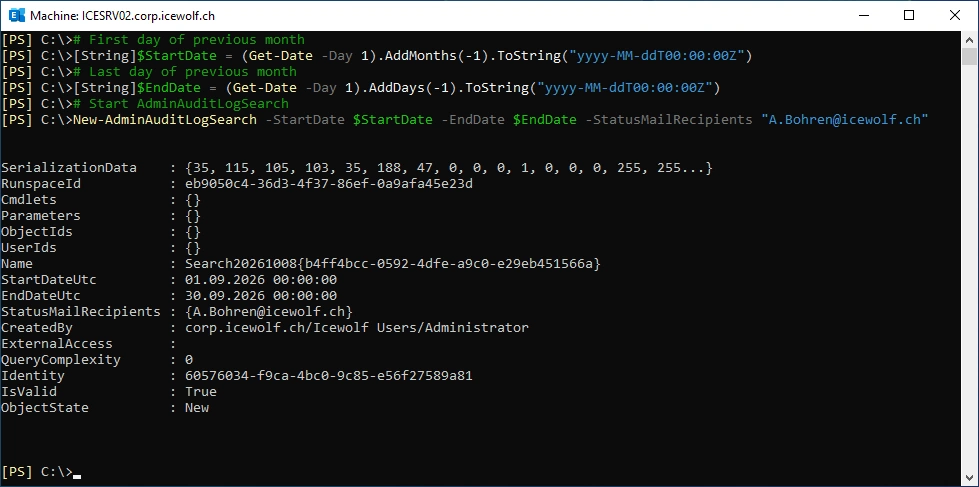
There was probably a sheduled Script to Export the Exchange Admin Audit Log every month
# First day of previous month
[String]$StartDate = (Get-Date -Day 1).AddMonths(-1).ToString("yyyy-MM-ddT00:00:00Z")
# Last day of previous month
[String]$EndDate = (Get-Date -Day 1).AddDays(-1).ToString("yyyy-MM-ddT00:00:00Z")
# Start AdminAuditLogSearch
New-AdminAuditLogSearch -StartDate $StartDate -EndDate $EndDate -StatusMailRecipients "A.Bohren@icewolf.ch"
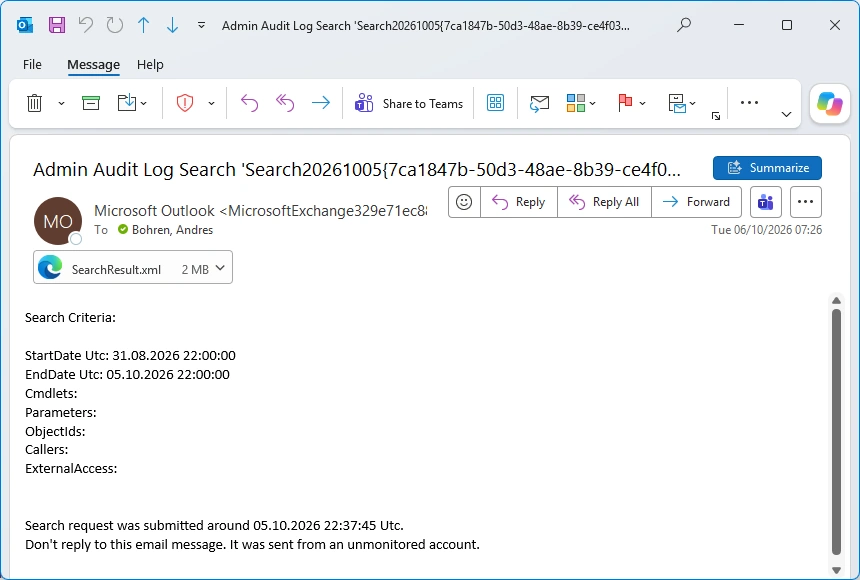
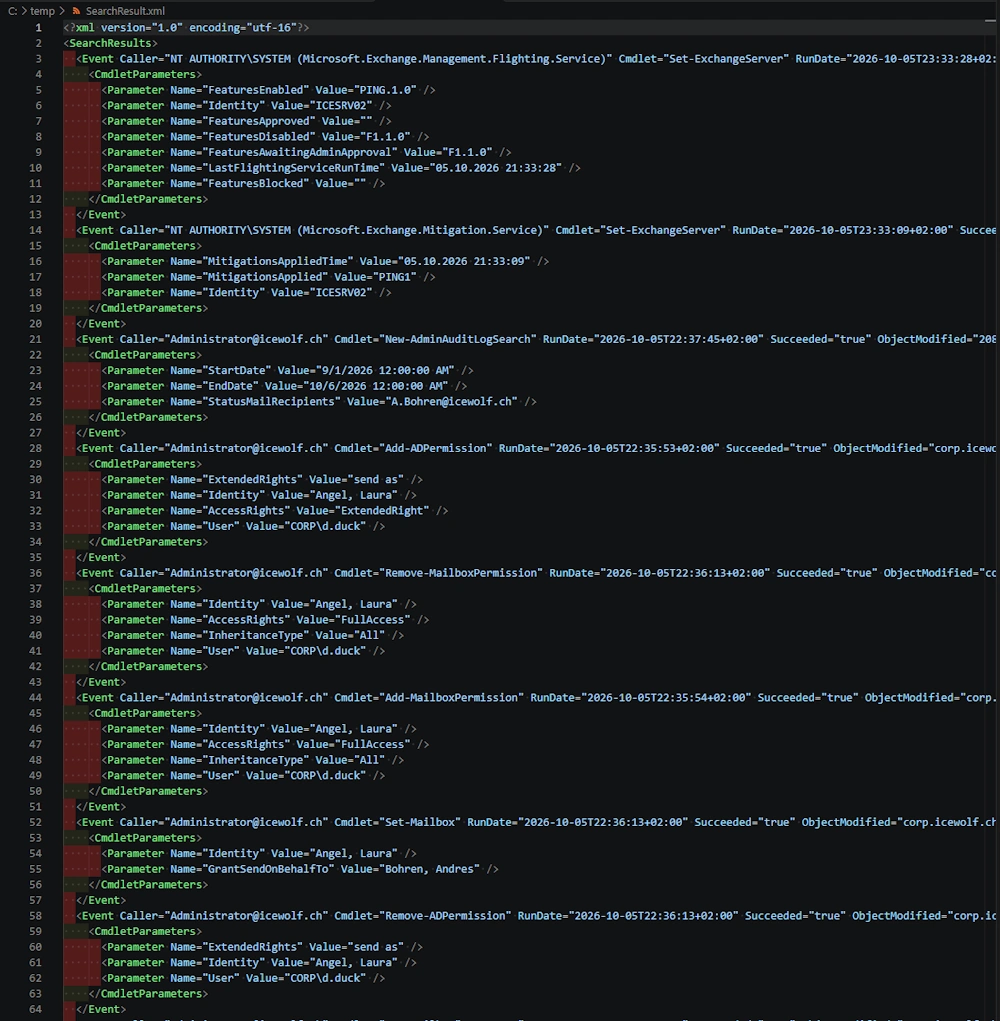
That’s the Mail with the Result of the AdminAuditLogSearch in an XML File
XML File looks like this
Let’s load the XML File in PowerShell
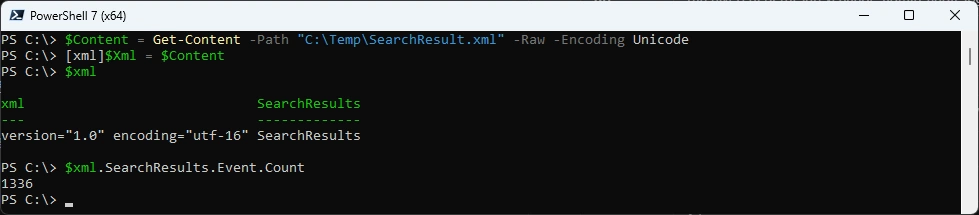
$Content = Get-Content -Path "C:\Temp\SearchResult.xml" -Raw -Encoding Unicode
[xml]$Xml = $Content
$xml
$xml.SearchResults.Event.Count
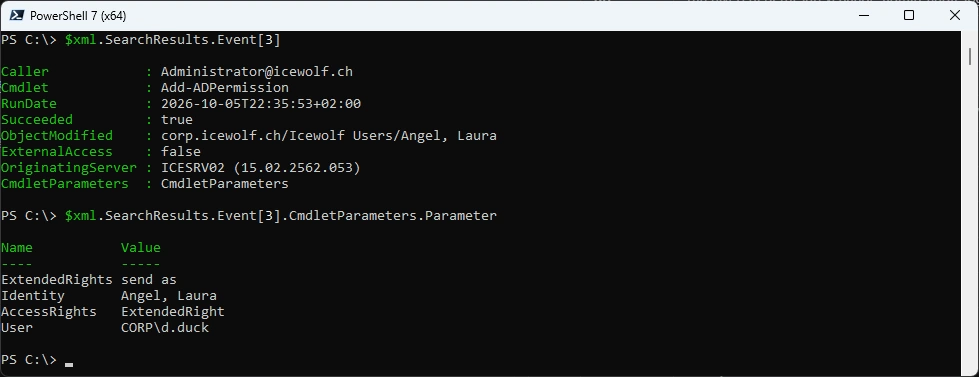
Check a Record with SendAs Permission
$xml.SearchResults.Event[3]
$xml.SearchResults.Event[3].CmdletParameters.Parameter
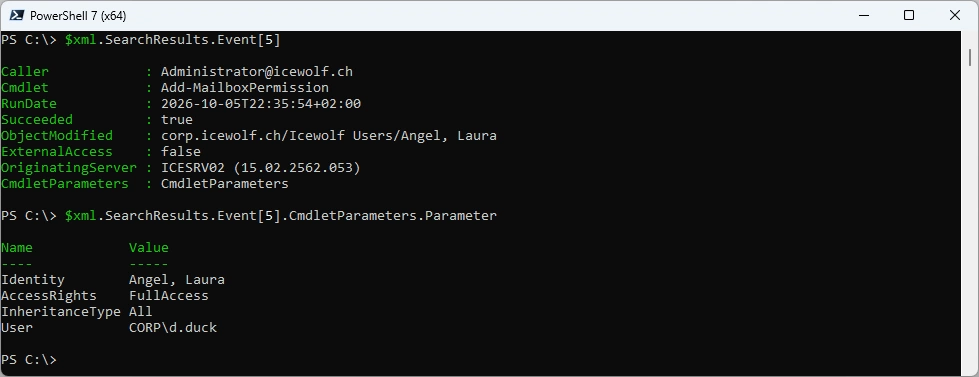
Check a Record with FullAccess Permission
$xml.SearchResults.Event[5]
$xml.SearchResults.Event[5].CmdletParameters.Parameter
Created a Script to Demo how to Filter only certain Commands and export it to CSV
###############################################################################
# Load SearchResult.xml from AdminAuditLogSearch
# and Export Add-/Remove-MailboxPermission and Add-/Remove-ADPermission
###############################################################################
$Content = Get-Content -Path "C:\Temp\SearchResult.xml" -Raw -Encoding Unicode
[xml]$Xml = $Content

$SearchedCommandlets = @("Add-MailboxPermission","Remove-MailboxPermission","Add-ADPermission","Remove-ADPermission")
$Result = $xml.SearchResults.Event | where {"$SearchedCommandlets" -match $_.Cmdlet}

$Report = [System.Collections.Generic.List[object]]::new()
Foreach ($Line in $Result)
{
    $myObject = [PSCustomObject]@{
    Date          = $Line.RunDate
    Caller        = $Line.Caller
    Cmdlet        = $Line.Cmdlet
    Object        = $Line.ObjectModified
    AccessRights  = ($Line.CmdletParameters.Parameter | Where-Object {$_.Name -eq "AccessRights"}).value
    ExtededRights = ($Line.CmdletParameters.Parameter | Where-Object {$_.Name -eq "ExtendedRights"}).value
    User          = ($Line.CmdletParameters.Parameter | Where-Object {$_.Name -eq "User"}).value
    }
    $Report.Add($myObject)
}

#Export to CSV
$Report | Export-Csv -Path C:\Temp\AdminAuditLog.csv -Encoding UTF8 -NoTypeInformation
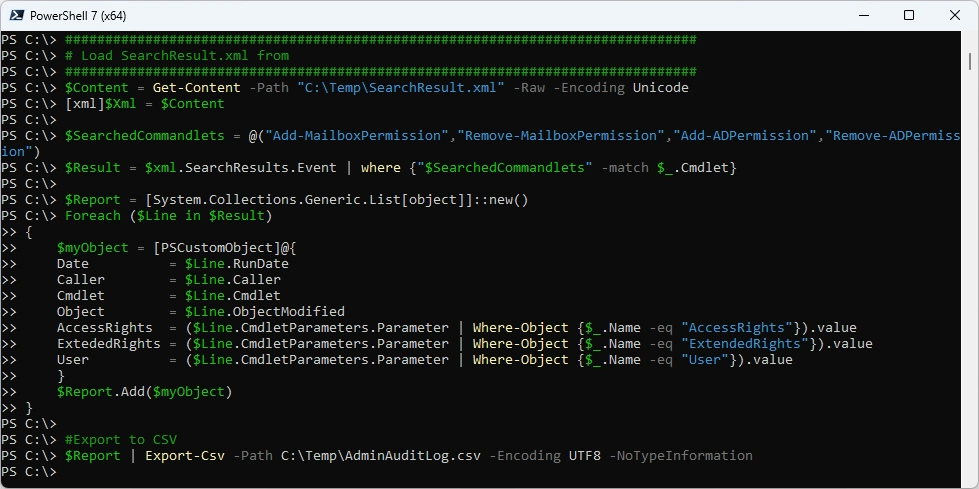
That is the Export

Purview Audit Log
In Exchange Online the Exchange Admin Audit Log is written to Purview Audit Log.
You can get the Entrys by searching for: Record Types = “ExchangeAdmin”
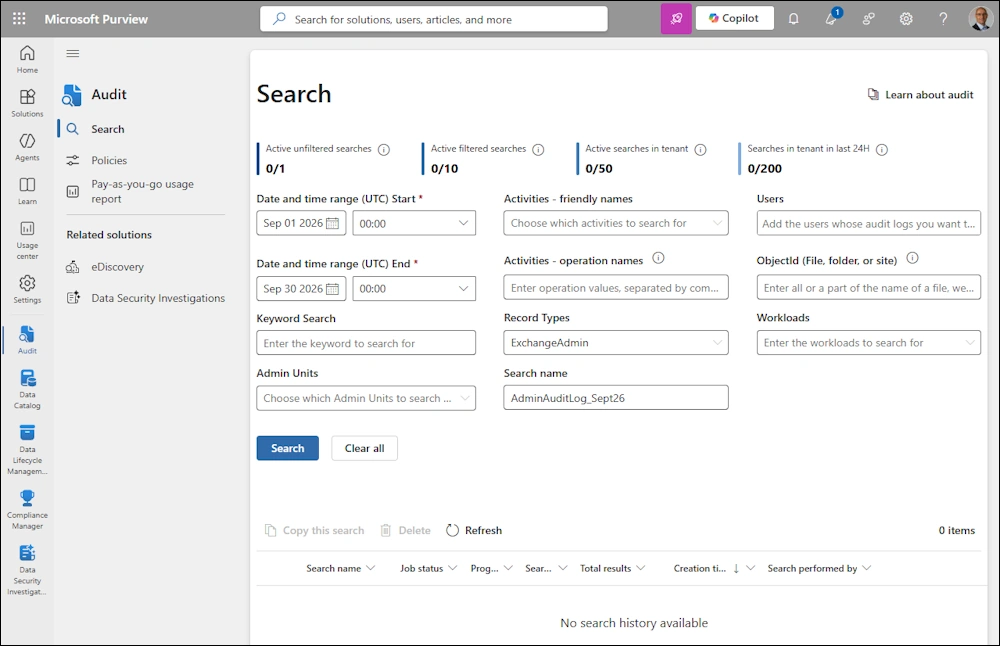
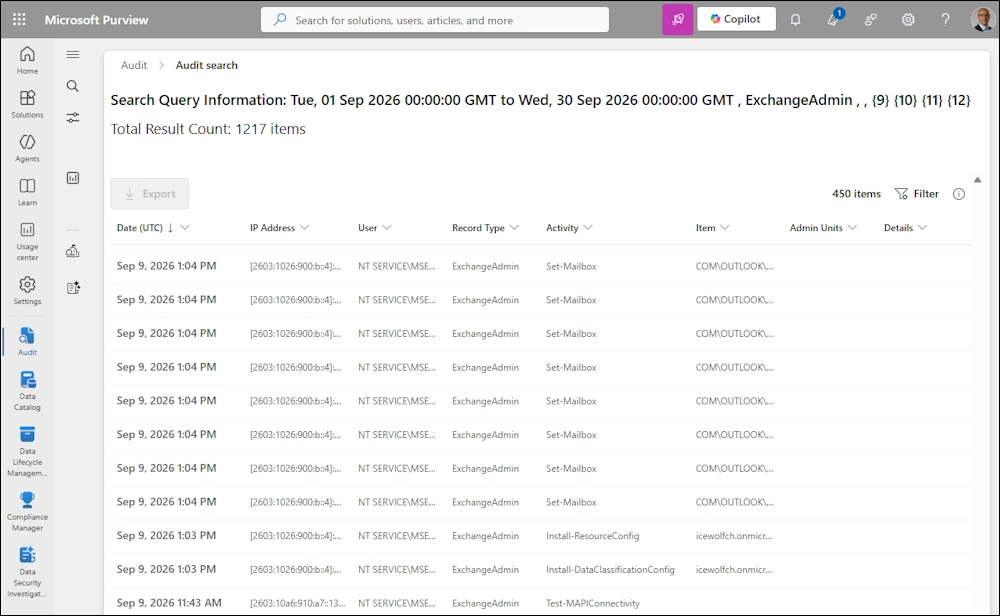
List of Results
Microsoft Graph Audit Log
Let’s do the Search with PowerShell and Microsoft Graph
$TenantId = "46bbad84-29f0-4e03-8d34-f6841a5071ad" #Icewolf
$AppID = "99d8df8d-67b6-4a3a-b915-5cfc835fbfc7" #AuditLog
$CertificateThumbprint = "FB40D47A0C0A23EA297B44A57272BCED352D0002" #O365Powershell5
Connect-MgGraph -ClientId $AppID -TenantId $TenantId -CertificateThumbprint $CertificateThumbprint -NoWelcome

###############################################################################
# Create Search
###############################################################################
Write-Output "Create Array"
$OperationsArray = @()

Write-Output "Create Search"
$DisplayName = "DemoSearch_" + (Get-Date -Format "yyyyMMdd_HHmm")
#[String]$StartDate = [datetime]::parseexact("2026-08-05", "yyyy-MM-dd", $null).Tostring("yyyy-MM-ddT00:00:00Z")
#[String]$EndDate = [datetime]::parseexact("2026-08-06", "yyyy-MM-dd", $null).Tostring("yyyy-MM-ddT00:00:00Z")

# First day of previous month
[String]$StartDate = (Get-Date -Day 1).AddMonths(-1).ToString("yyyy-MM-ddT00:00:00Z")

# Last day of previous month
[String]$EndDate = (Get-Date -Day 1).AddDays(-1).ToString("yyyy-MM-ddT00:00:00Z")

$Uri = "https://graph.microsoft.com/beta/security/auditLog/queries"
$SearchParameters = @{
    displayName         = "$DisplayName"
    filterStartDateTime = "$StartDate"
    filterEndDateTime     = "$EndDate"
    recordTypeFilters     = @("ExchangeAdmin")
    operationFilters = @(
    "Add-MailboxPermission",
    "Remove-MailboxPermission",
    "Add-RecipientPermission",
    "Remove-RecipientPermission"
    )
}

Write-Output "Invoke Search"
$SearchQuery = Invoke-MgGraphRequest -Method POST -Uri $Uri -Body $SearchParameters
$SearchId = $SearchQuery.Id
Write-Output "Searchid: $SearchId"

If ($SearchId -eq $null -or $SearchId -eq "")
{
    Write-Output "No SearchId > Aborting Script"
    Exit
}
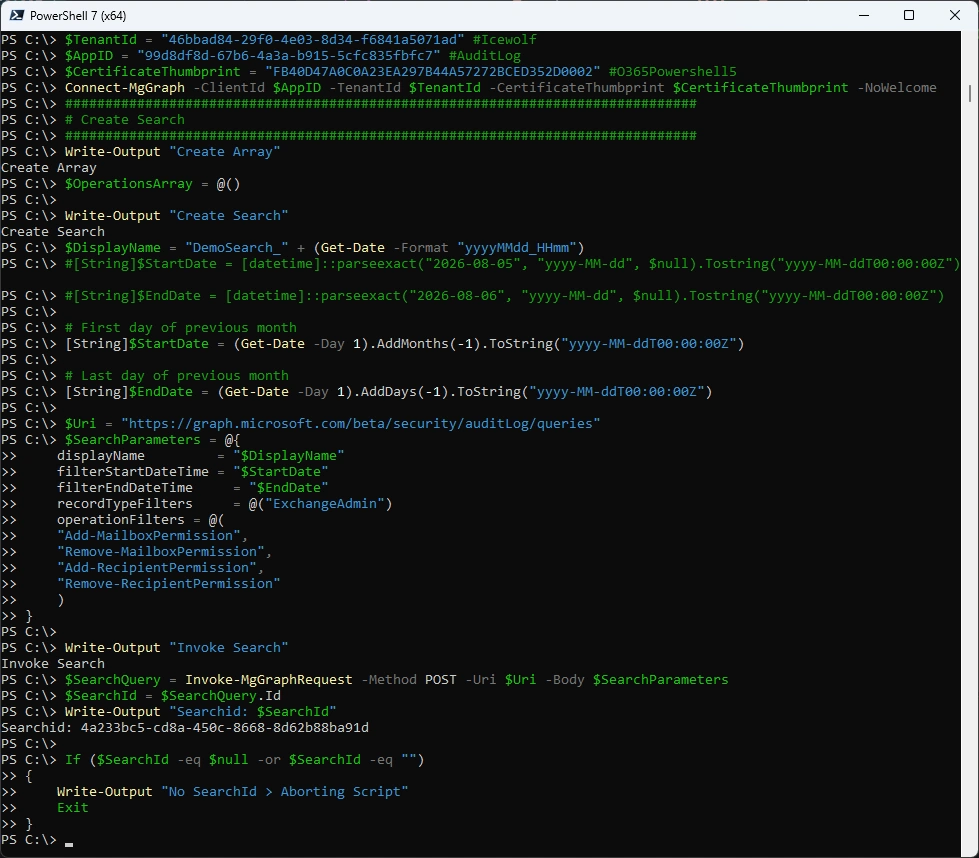
Check if the SearchQuery is running and has suceeded
###############################################################################
# Check if SearchQuery Suceeded
###############################################################################
Write-Output "Wait for Search to complete"
#$AuditSearch = Get-MgBetaSecurityAuditLogQuery -AuditLogQueryId $SearchId | fl
#$AuditSearch = Get-MgBetaSecurityAuditLogQuery -AuditLogQueryId $SearchId
$URI = "https://graph.microsoft.com/beta/security/auditLog/queries/$searchId"
$AuditSearch = Invoke-MgGraphRequest -Method "GET" -Uri $Uri
$AuditSearchStatus = $AuditSearch.Status
Write-Output "Status: $AuditSearchStatus"
While ($AuditSearch.Status -ne "succeeded")
{
    #$AuditSearch = Get-MgBetaSecurityAuditLogQuery -AuditLogQueryId $SearchId
    $URI = "https://graph.microsoft.com/beta/security/auditLog/queries/$searchId"
    $AuditSearch = Invoke-MgGraphRequest -Method "GET" -Uri $Uri
    $AuditSearchStatus = $AuditSearch.Status
    Write-Output "Status: $AuditSearchStatus"
    Start-Sleep -Seconds 60

    If ($AuditSearchStatus -eq "failed")
    {
        Write-Output "Audit Search failed - aborting Script"
        Exit
    }
}
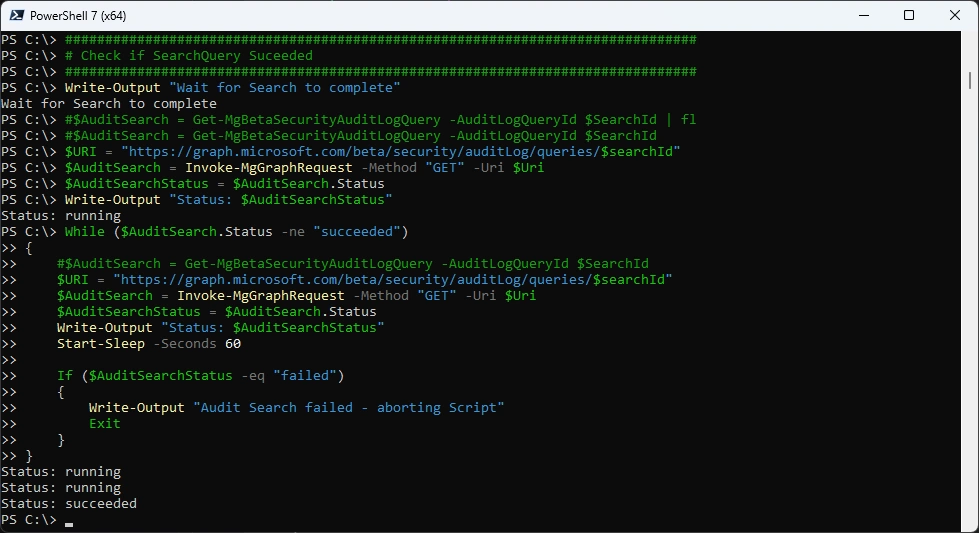
Once the SearchQuery has suceeded we now can get the Data
###############################################################################
# Get Data from SearchQuery
###############################################################################
Write-Output "Loop through results"
$Uri = ("https://graph.microsoft.com/beta/security/auditLog/queries/{0}/records" -f $SearchId)
[array]$SearchRecords = Invoke-MgGraphRequest -Uri $Uri -Method GET
$AuditRecords += $SearchRecords.value

# Paginate to fetch all available audit records
$NextLink = $SearchRecords.'@Odata.NextLink'
While ($null -ne $NextLink) {
    $SearchRecords = $null
    [array]$SearchRecords = Invoke-MgGraphRequest -Uri $NextLink -Method GET
    $AuditRecords += $SearchRecords.value
    Write-Host ("{0} audit records fetched so far..." -f $AuditRecords.count)
    $NextLink = $SearchRecords.'@odata.NextLink'
}
$AuditRecordCount = $AuditRecords.Count
Write-Output "Audit Records found: $AuditRecordCount"

#Filter Output
$AuditRecords.AuditData |
    Select-Object CreationTime,
                  UserKey,
                  UserId,
                  ObjectId,
                  Operation,
                  @{
                      Name = 'AccessRights'
                      Expression = {
                          ($_.Parameters | Where-Object Name -eq 'AccessRights').Value
                      }
                  } |
    ConvertTo-Json -Depth 5 |
Set-Content $OutputFile
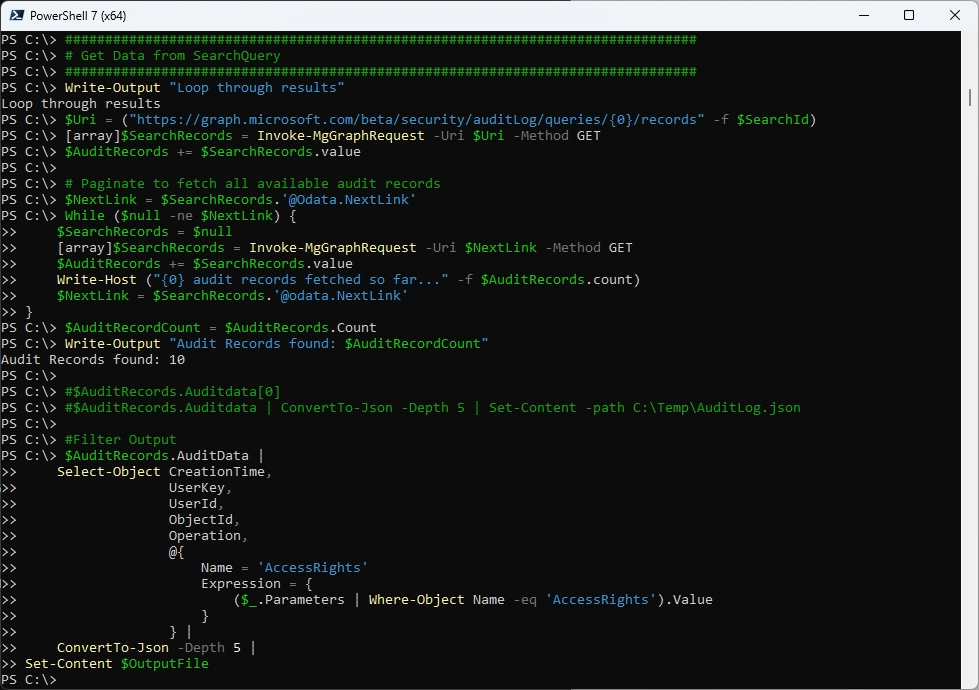
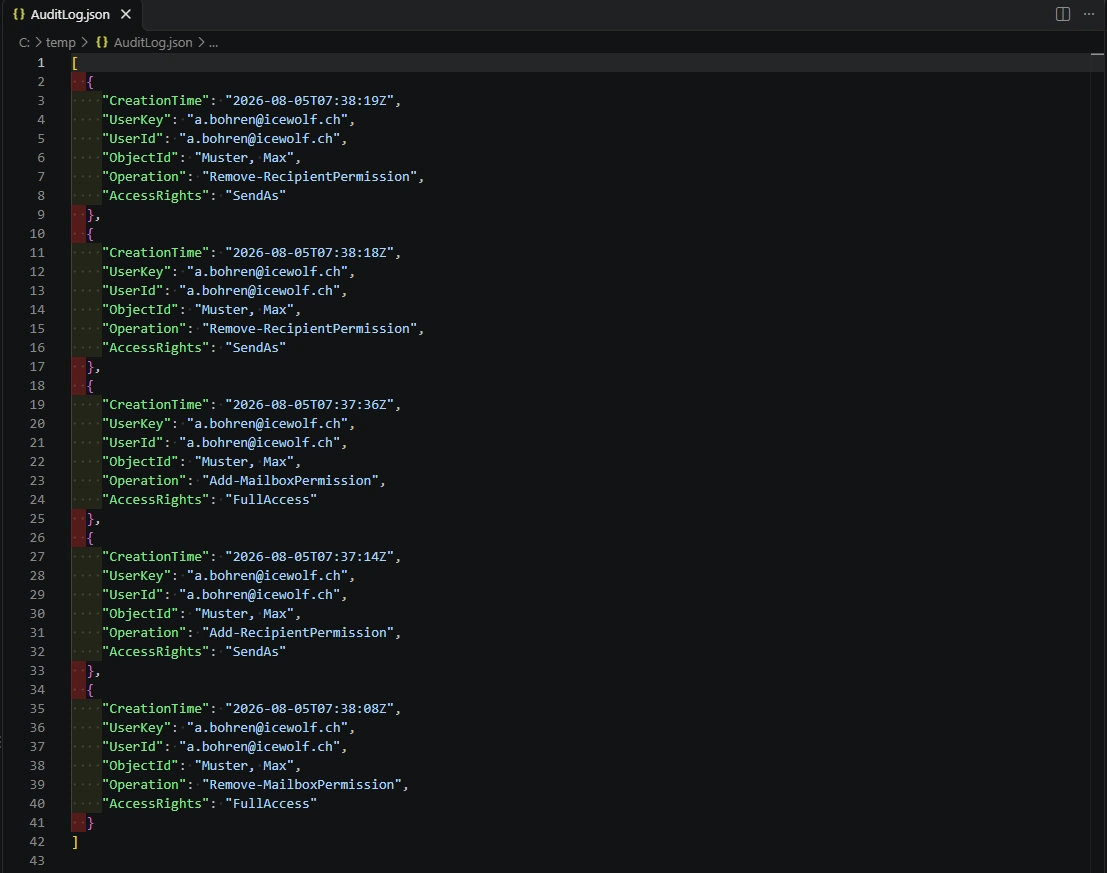
That is the Output that is created. Filtered the JSON to only show the required Attributes
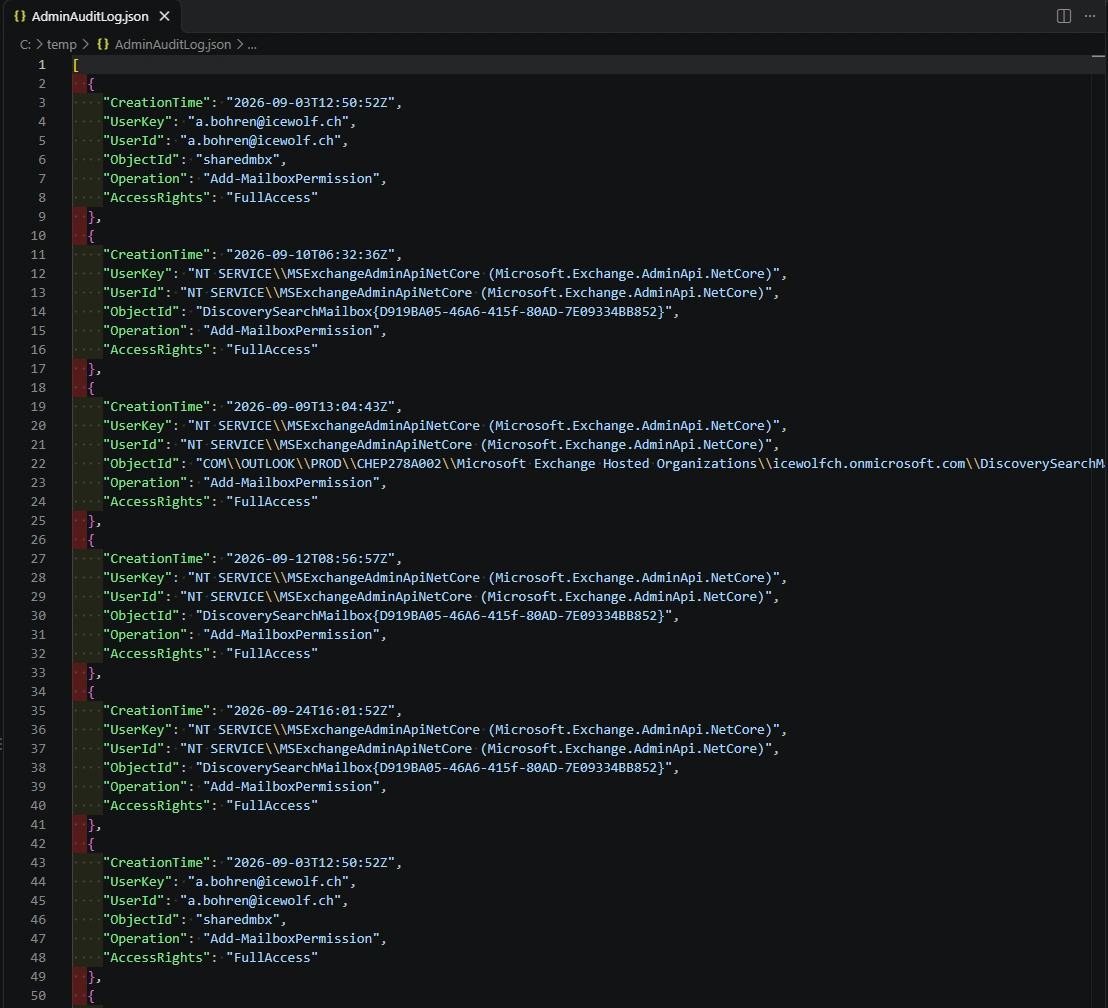
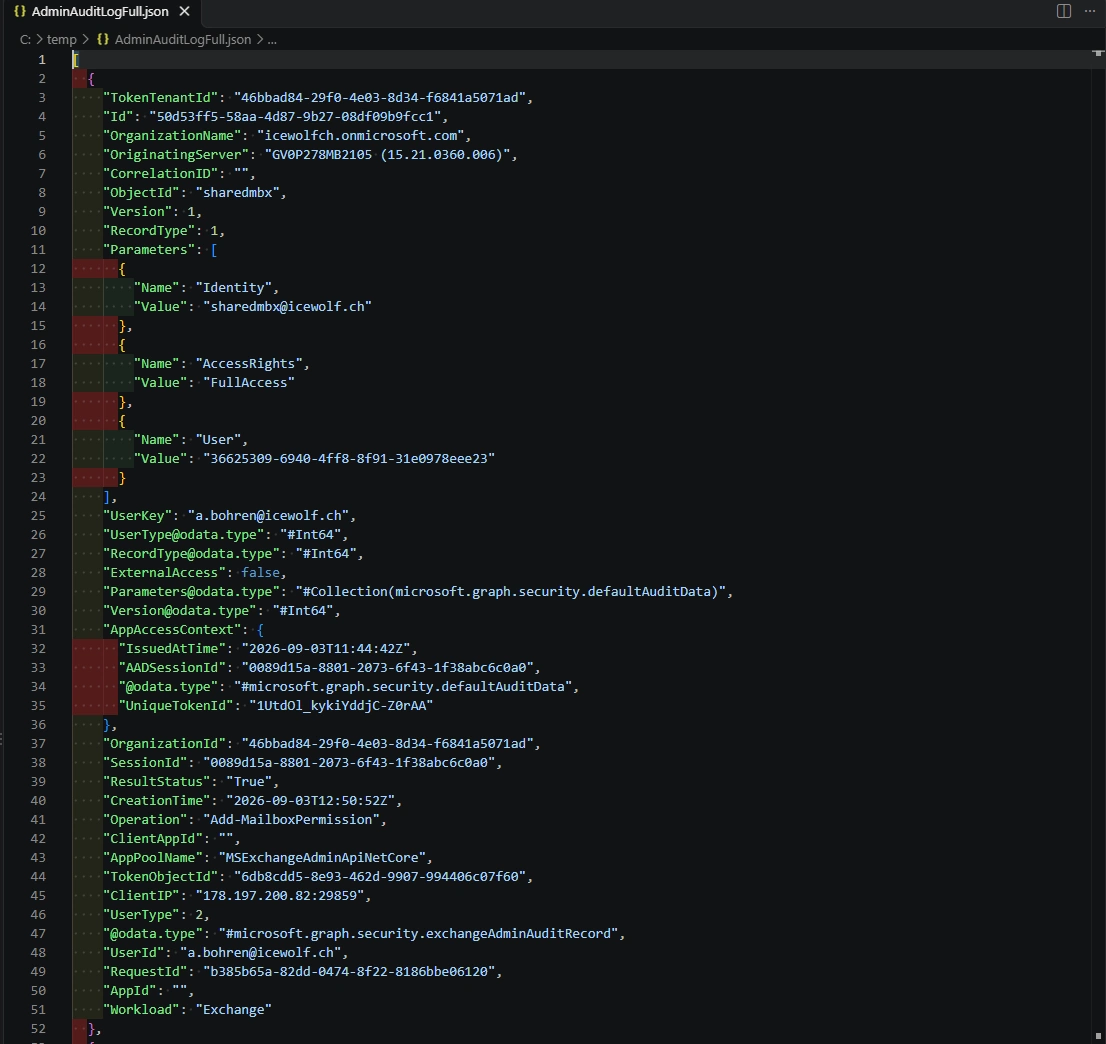
If you save the Auditrecords, you can see all the Attributes that are present
$AuditRecords.Auditdata[0]
$AuditRecords.Auditdata | ConvertTo-Json -Depth 5 | Set-Content -path C:\Temp\AdminAuditLogFull.json
Azure Automation Account
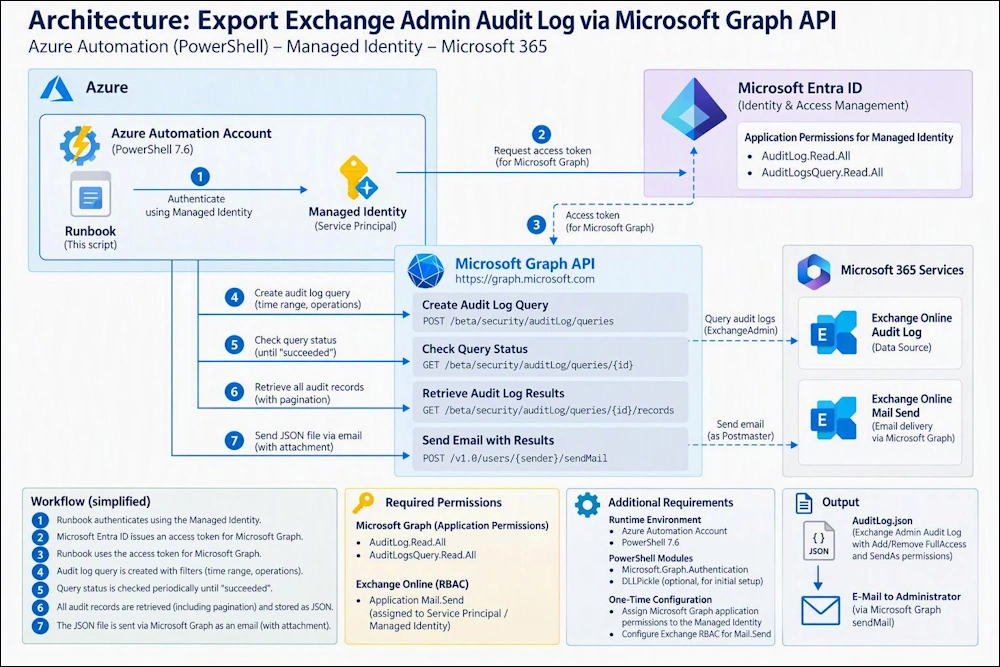
Here is the Architecure of my Solution
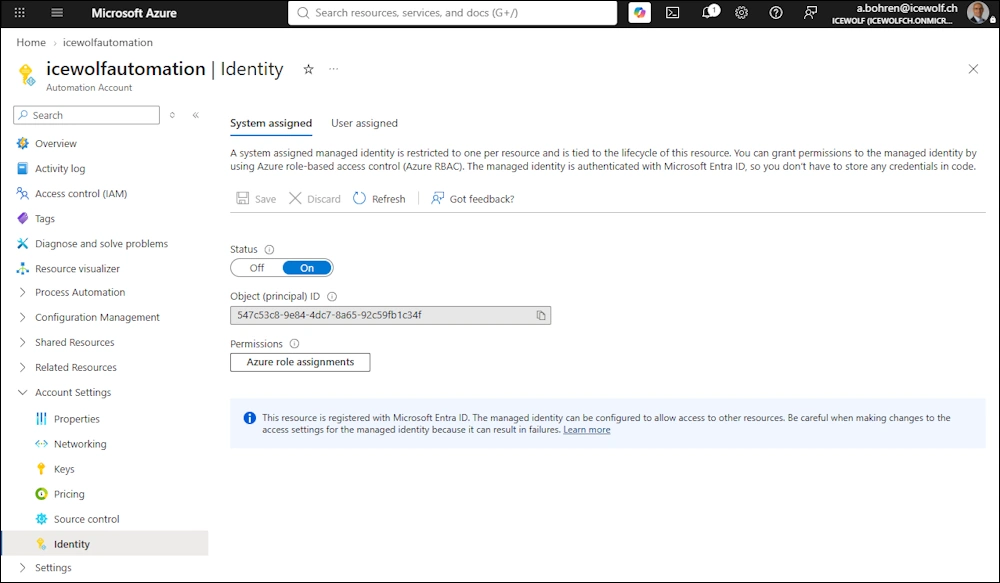
Managed Identity on Azure Automation Account
Create a System assigned Managed Identity on your Azure Automation Account
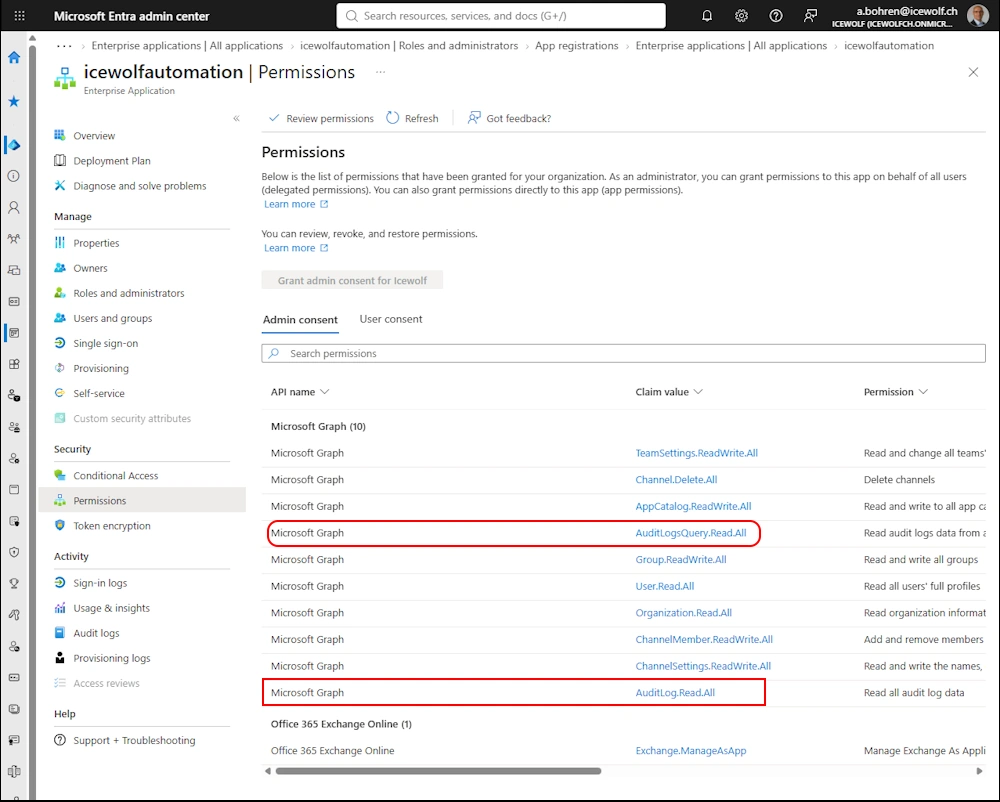
Add the following Permissions to your Service Principal (Managed Identity of the Service Principal):
- AuditLog.Read.All
- AuditLogsQuery.Read.All
Exchange Online RBAC Permissions for the Service Principal
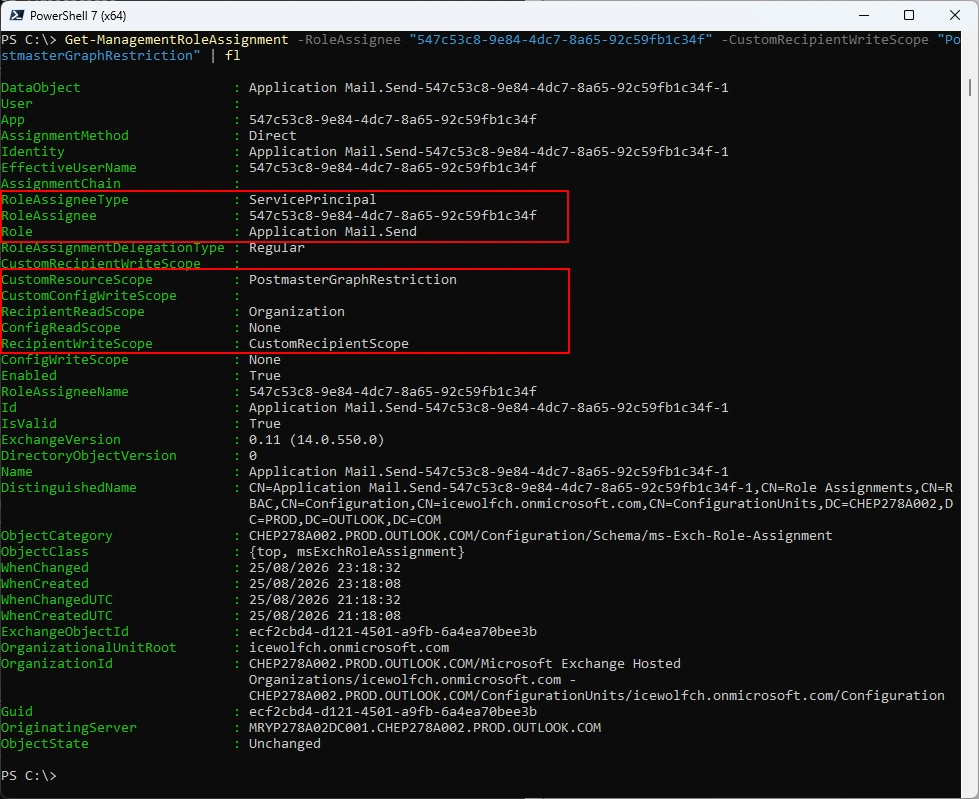
To be able to send the Mail at the end, you need to have a Service Principal in Exchange Online
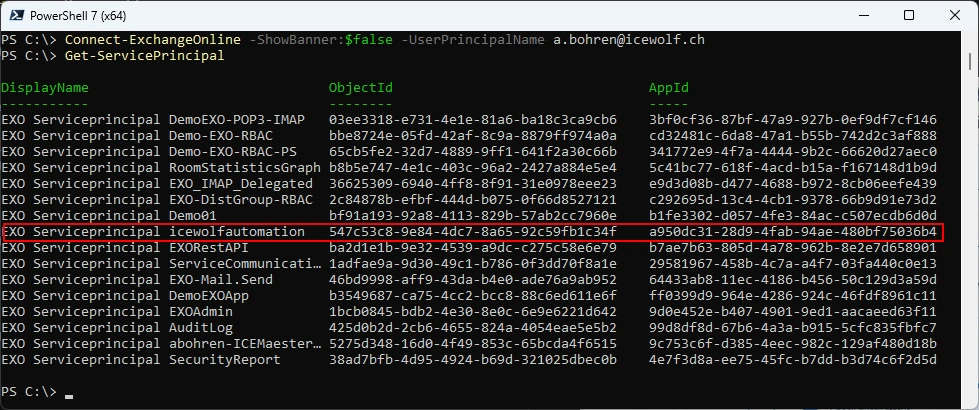
The Service Principal needs to have the Exchange Online RBAC Permission “Application Mail.Send” and is limited to send from Members in the “PostmasterGraphRestriction” Distribution Group
Runbook
I’ve created a Runbook “EXO_AdminAuditLog”
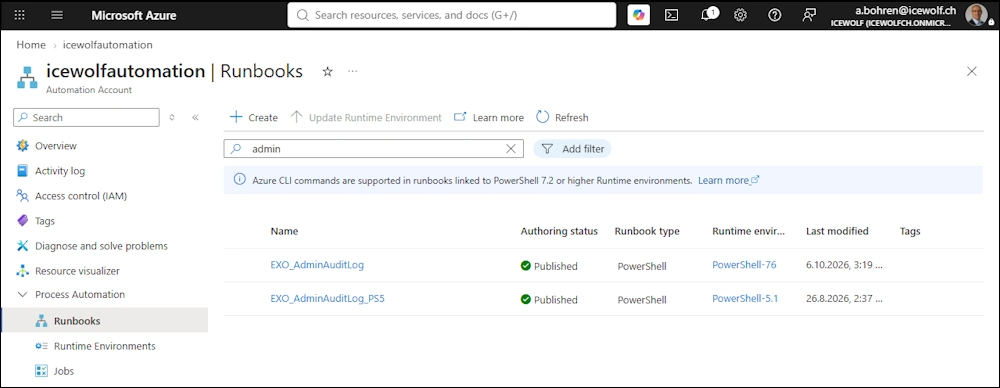
The Runbook can have a Schedule
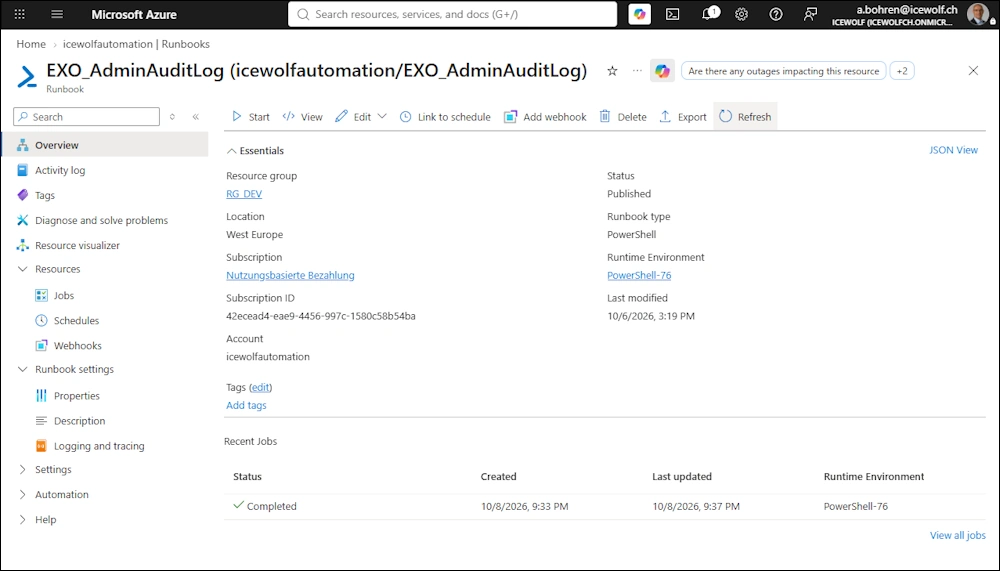
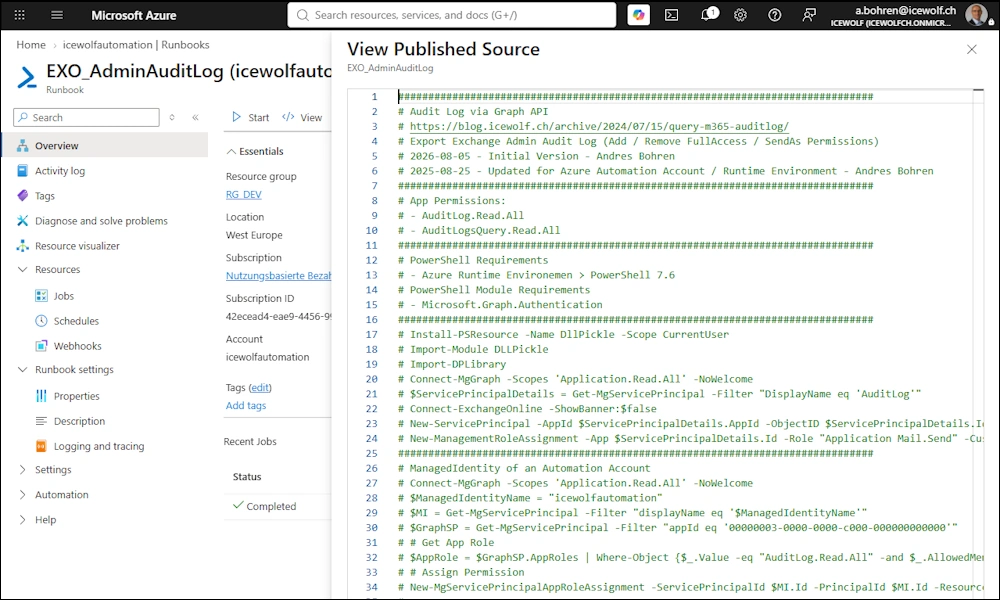
Where is the Code? Check it under “View” or “Edit”
Running the Azure Runbook
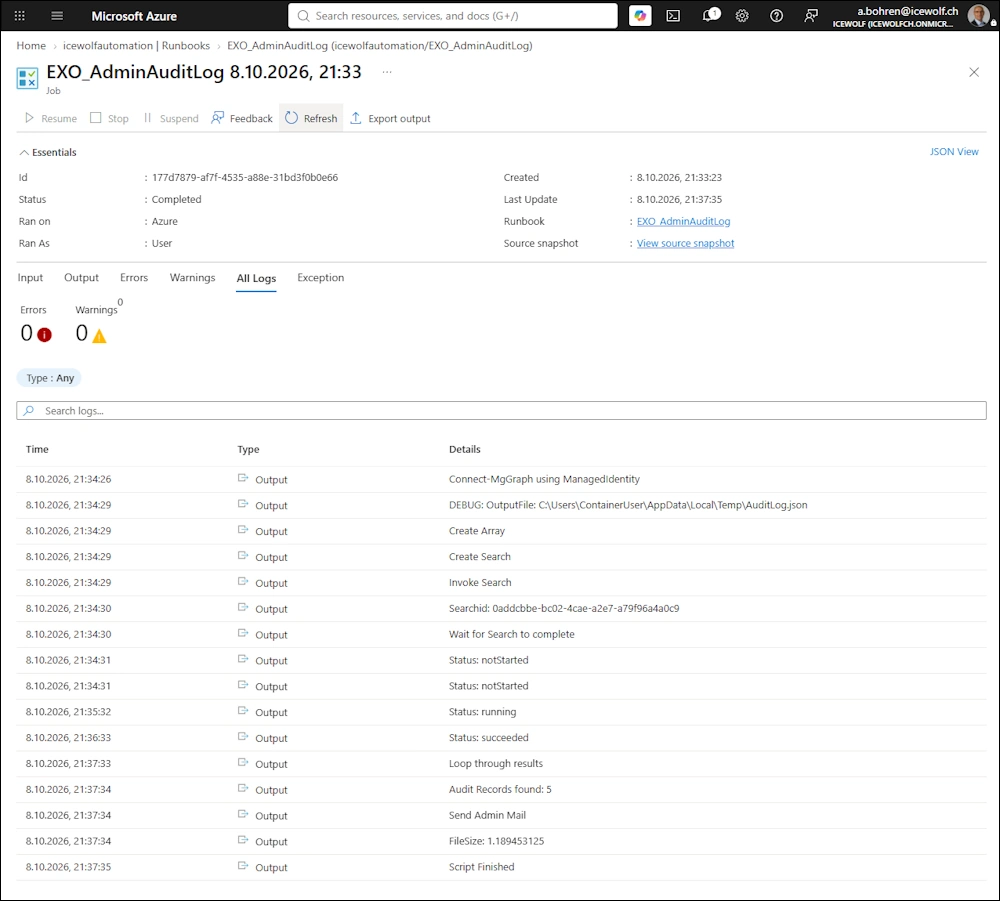
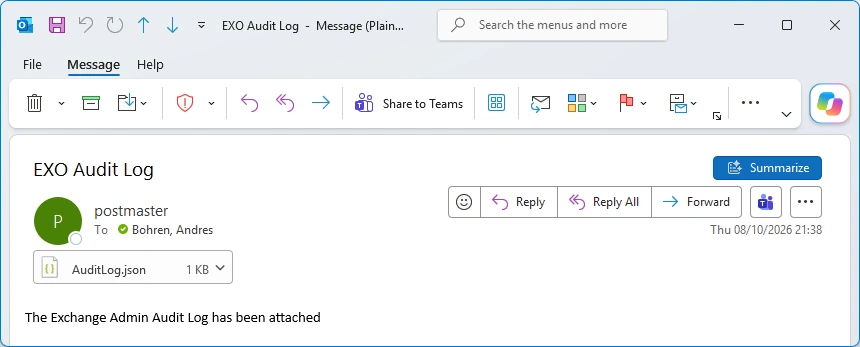
I’ll get an email with the AuditLog.json attached
That’s how the AuditLog.json looks
Azure Runbook Script
Here is the whole Script also available in my GitHub Repo
###############################################################################
# Audit Log via Graph API
# https://blog.icewolf.ch/archive/2024/07/15/query-m365-auditlog/
# Export Exchange Admin Audit Log (Add / Remove FullAccess / SendAs Permissions)
# 2026-08-05 - Initial Version - Andres Bohren
# 2025-08-25 - Updated for Azure Automation Account / Runtime Environment - Andres Bohren
###############################################################################
# App Permissions:
# - AuditLog.Read.All
# - AuditLogsQuery.Read.All
###############################################################################
# PowerShell Requirements
# - Azure Runtime Environemen > PowerShell 7.6
# PowerShell Module Requirements
# - Microsoft.Graph.Authentication
###############################################################################
# Install-PSResource -Name DllPickle -Scope CurrentUser
# Import-Module DLLPickle
# Import-DPLibrary
# Connect-MgGraph -Scopes 'Application.Read.All' -NoWelcome
# $ServicePrincipalDetails = Get-MgServicePrincipal -Filter "DisplayName eq 'AuditLog'"
# Connect-ExchangeOnline -ShowBanner:$false
# New-ServicePrincipal -AppId $ServicePrincipalDetails.AppId -ObjectID $ServicePrincipalDetails.Id -DisplayName "EXO Serviceprincipal $($ServicePrincipalDetails.Displayname)"
# New-ManagementRoleAssignment -App $ServicePrincipalDetails.Id -Role "Application Mail.Send" -CustomResourceScope "PostmasterGraphRestriction"
###############################################################################
# ManagedIdentity of an Automation Account
# Connect-MgGraph -Scopes 'Application.Read.All' -NoWelcome
# $ManagedIdentityName = "icewolfautomation"
# $MI = Get-MgServicePrincipal -Filter "displayName eq '$ManagedIdentityName'"
# $GraphSP = Get-MgServicePrincipal -Filter "appId eq '00000003-0000-0000-c000-000000000000'"
# # Get App Role
# $AppRole = $GraphSP.AppRoles | Where-Object {$_.Value -eq "AuditLog.Read.All" -and $_.AllowedMemberTypes -contains "Application"}
# # Assign Permission
# New-MgServicePrincipalAppRoleAssignment -ServicePrincipalId $MI.Id -PrincipalId $MI.Id -ResourceId $GraphSP.Id -AppRoleId $AppRole.Id
#
# $AppRole = $GraphSP.AppRoles | Where-Object {$_.Value -eq "AuditLogsQuery.Read.All" -and $_.AllowedMemberTypes -contains "Application"}
# # Assign Permission
# New-MgServicePrincipalAppRoleAssignment -ServicePrincipalId $MI.Id -PrincipalId $MI.Id -ResourceId $GraphSP.Id -AppRoleId $AppRole.Id
#
# # Exchange RBAC > Managed Identity Mail.Send
# Connect-ExchangeOnline -ShowBanner:$false
# New-ServicePrincipal -AppId $MI.AppId -ObjectID $MI.Id -DisplayName "EXO Serviceprincipal $($MI.Displayname)"
# New-ManagementRoleAssignment -App $MI.Id -Role "Application Mail.Send" -CustomResourceScope "PostmasterGraphRestriction"
###############################################################################
# Entra App > Icewolf
#Write-Output "Connect-MgGraph Entra App"
#$TenantId = "46bbad84-29f0-4e03-8d34-f6841a5071ad" #Icewolf
#$AppID = "99d8df8d-67b6-4a3a-b915-5cfc835fbfc7" #AuditLog
#$CertificateThumbprint = "FB40D47A0C0A23EA297B44A57272BCED352D0002" #O365Powershell5
#Connect-MgGraph -ClientId $AppID -TenantId $TenantId -CertificateThumbprint $CertificateThumbprint -NoWelcome

Write-Output "Connect-MgGraph using ManagedIdentity"
Connect-MgGraph -Identity -NoWelcome

# Variables
$Sender = "postmaster@icewolf.ch"
$Recipient = "a.bohren@icewolf.ch"

#static
$path = $env:temp
$OutputFile = $Path + "\AuditLog.json"
Write-Output "DEBUG: OutputFile: $OutputFile"


###############################################################################
# Create Search
###############################################################################
Write-Output "Create Array"
$OperationsArray = @()

Write-Output "Create Search"
$DisplayName = "DemoSearch_" + (Get-Date -Format "yyyyMMdd_HHmm")
#[String]$StartDate = [datetime]::parseexact("2026-08-05", "yyyy-MM-dd", $null).Tostring("yyyy-MM-ddT00:00:00Z")
#[String]$EndDate = [datetime]::parseexact("2026-08-06", "yyyy-MM-dd", $null).Tostring("yyyy-MM-ddT00:00:00Z")

# First day of previous month
[String]$StartDate = (Get-Date -Day 1).AddMonths(-1).ToString("yyyy-MM-ddT00:00:00Z")

# Last day of previous month
[String]$EndDate = (Get-Date -Day 1).AddDays(-1).ToString("yyyy-MM-ddT00:00:00Z")

$Uri = "https://graph.microsoft.com/beta/security/auditLog/queries"
$SearchParameters = @{
    displayName         = "$DisplayName"
    filterStartDateTime = "$StartDate"
    filterEndDateTime     = "$EndDate"
    recordTypeFilters     = @("ExchangeAdmin")
    operationFilters = @(
    "Add-MailboxPermission",
    "Remove-MailboxPermission",
    "Add-RecipientPermission",
    "Remove-RecipientPermission"
    )
}

Write-Output "Invoke Search"
$SearchQuery = Invoke-MgGraphRequest -Method POST -Uri $Uri -Body $SearchParameters
$SearchId = $SearchQuery.Id
Write-Output "Searchid: $SearchId"

If ($SearchId -eq $null -or $SearchId -eq "")
{
    Write-Output "No SearchId > Aborting Script"
    Exit
}

###############################################################################
# Check if SearchQuery Suceeded
###############################################################################
Write-Output "Wait for Search to complete"
#$AuditSearch = Get-MgBetaSecurityAuditLogQuery -AuditLogQueryId $SearchId | fl
#$AuditSearch = Get-MgBetaSecurityAuditLogQuery -AuditLogQueryId $SearchId
$URI = "https://graph.microsoft.com/beta/security/auditLog/queries/$searchId"
$AuditSearch = Invoke-MgGraphRequest -Method "GET" -Uri $Uri
$AuditSearchStatus = $AuditSearch.Status
Write-Output "Status: $AuditSearchStatus"
While ($AuditSearch.Status -ne "succeeded")
{
    #$AuditSearch = Get-MgBetaSecurityAuditLogQuery -AuditLogQueryId $SearchId
    $URI = "https://graph.microsoft.com/beta/security/auditLog/queries/$searchId"
    $AuditSearch = Invoke-MgGraphRequest -Method "GET" -Uri $Uri
    $AuditSearchStatus = $AuditSearch.Status
    Write-Output "Status: $AuditSearchStatus"
    Start-Sleep -Seconds 60

    If ($AuditSearchStatus -eq "failed")
    {
        Write-Output "Audit Search failed - aborting Script"
        Exit
    }
}

###############################################################################
# Get Data from SearchQuery
###############################################################################
Write-Output "Loop through results"
$Uri = ("https://graph.microsoft.com/beta/security/auditLog/queries/{0}/records" -f $SearchId)
[array]$SearchRecords = Invoke-MgGraphRequest -Uri $Uri -Method GET
$AuditRecords += $SearchRecords.value

# Paginate to fetch all available audit records
$NextLink = $SearchRecords.'@Odata.NextLink'
While ($null -ne $NextLink) {
    $SearchRecords = $null
    [array]$SearchRecords = Invoke-MgGraphRequest -Uri $NextLink -Method GET
    $AuditRecords += $SearchRecords.value
    Write-Host ("{0} audit records fetched so far..." -f $AuditRecords.count)
    $NextLink = $SearchRecords.'@odata.NextLink'
}
$AuditRecordCount = $AuditRecords.Count
Write-Output "Audit Records found: $AuditRecordCount"

#$AuditRecords.Auditdata[0]
#$AuditRecords.Auditdata | ConvertTo-Json -Depth 5 | Set-Content -path C:\Temp\AuditLog.json

#Filter Output
$AuditRecords.AuditData |
    Select-Object CreationTime,
                  UserKey,
                  UserId,
                  ObjectId,
                  Operation,
                  @{
                      Name = 'AccessRights'
                      Expression = {
                          ($_.Parameters | Where-Object Name -eq 'AccessRights').Value
                      }
                  } |
    ConvertTo-Json -Depth 5 |
Set-Content $OutputFile

###############################################################################
# Send Admin Email
###############################################################################
Write-Output "Send Admin Mail"

$FileSize = (Get-Item $Outputfile).Length / 1KB
Write-Output "FileSize: $FileSize"

# Better code is to use .NET to convert to BASE64
$Base64 = [Convert]::ToBase64String([System.IO.File]::ReadAllBytes("$OutputFile"))


$URI = "https://graph.microsoft.com/v1.0/users/$sender/sendMail"

$Body = @"
{
    "message": {
    "subject": "EXO Audit Log",
    "body": {
        "contentType": "Text",
        "content": "The Exchange Admin Audit Log has been attached"
    },
    "toRecipients": [
        {
        "emailAddress": {
            "address": "$Recipient"
        }
      }
    ],
    "attachments": [
    {
        "@odata.type": "#microsoft.graph.fileAttachment",
        "name": "AuditLog.json",
        "contentType": "application/json",
        "contentBytes": "$Base64"
    }
    ]
    }
}
"@

$ContentType = "application/json"
$Result = Invoke-MgGraphRequest -URI $URI -Method POST -Body $Body -ContentType $ContentType

Write-Output "Script Finished"
Summary
Another great Story of combining the pwower of the Cloud. Leveraging Azure Automation Account with Managed Identity, Microsoft Graph to search for AuditLogs. PowerShell to do the Logic and Filtering and finally Exchange Online to send the Email.
Regards
Andres Bohren
Exchange Logo PowerShell Logo Security Logo

